Your Complete Guide
This guide will walk you through using Code Input's three-way merge editor to resolve Git conflicts efficiently and confidently.
Git Three-Way Merge
Git merge conflicts can be intimidating, but understanding the concept of a three-way merge makes them much easier to handle. Let's break it down in a straightforward way.
When you're merging branches in Git, most of the time Git can automatically figure out how to combine changes. However, when the same part of a file has been modified in different ways on both branches, Git needs your help to decide what to keep.
A three-way merge is Git's way of showing you:
- The common ancestor version (the "base")
- Your version (the current branch)
- Their version (the branch you're trying to merge in)
Having these three versions side by side is incredibly useful because it lets you see:
- What the code looked like before any changes
- What changes you made
- What changes the other developer made
This context makes it much easier to make an informed decision about how to resolve the conflict. You can choose to keep your changes, use their changes, or even create a completely new solution that combines both approaches.
Think of it like comparing different drafts of a document - it's helpful to see the original version and both sets of changes to decide on the final version.
Code Input Three-Way Merge Editor
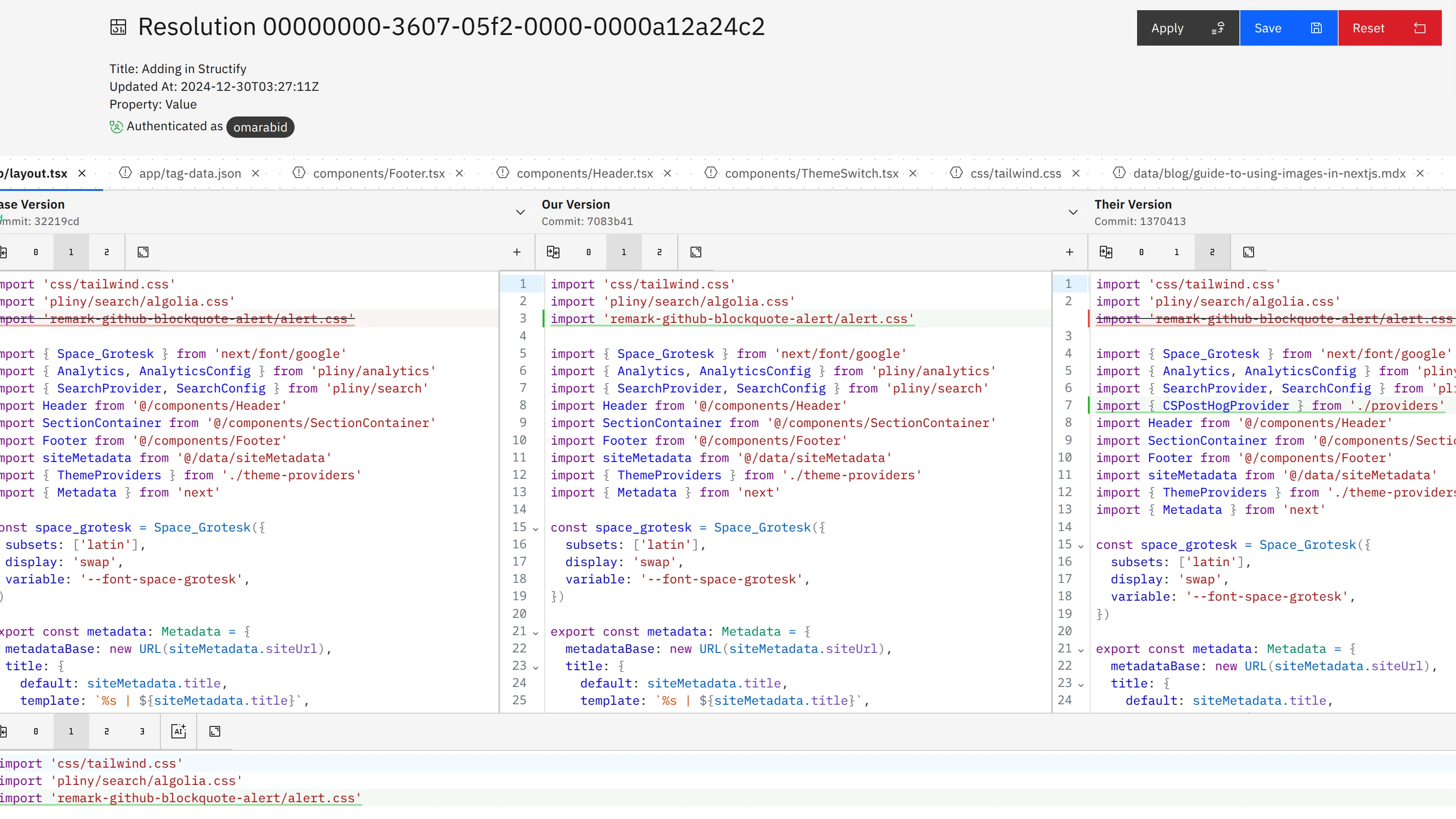
Code Input's web-based merge editor brings the power of three-way merging directly to your browser. No more switching between terminal commands and your IDE. No more remembering complex Git conflict markers. Everything you need to resolve conflicts is presented in a clean, intuitive interface.
Getting Started
To start resolving merge conflicts with Code Input:
-
Connect Your GitHub Account - Simply sign in with your GitHub account. Code Input uses secure OAuth authentication, so you never need to share your credentials.
-
Select Your Repository - Browse your repositories and find the pull request or branch with conflicts. Code Input works with both public and private repositories.
-
Open the Merge Editor - Click on any conflicting file to launch the three-way merge editor. The editor displays:
- Left Panel: Your changes (the current branch)
- Right Panel: Their changes (the incoming branch)
- Center Panel: The common ancestor (the base version before diverging)
Navigating Conflicts
The merge editor makes it easy to jump between conflict regions:
- Conflict Navigation: Use the Previous/Next buttons to jump directly to each conflict marker
- Visual Highlighting: Conflicting sections are clearly highlighted, so you can immediately spot where decisions need to be made
- Syntax Highlighting: Code is syntax-highlighted based on the file type, making it easier to read and understand the context
Resolving Conflicts
For each conflict, you have several options:
-
Accept Your Change: Click the "Accept Yours" button to keep your version of the conflicting code
-
Accept Their Change: Click the "Accept Theirs" button to use the incoming version
-
Edit Directly: Click into the merged output panel and manually edit the resolution. This is perfect for combining elements from both versions or writing a completely new solution
-
Use All Changes: For additions on both sides, you can choose to include both sets of changes
The editor updates in real-time as you make decisions, showing you exactly what the final merged file will look like.
AI-Powered Suggestions
When you're unsure how to resolve a conflict, Code Input's AI assistance can help:
- Click the AI Suggestion button - The AI analyzes both versions of the code
- Review the proposed resolution - The AI suggests a merge that respects both changes
- Accept or modify - You can accept the suggestion as-is or use it as a starting point for your own resolution
The AI considers code context, patterns, and best practices to suggest resolutions that maintain code quality and consistency.
Pushing Your Resolution
Once you've resolved all conflicts in a file:
- Mark as Resolved: Click the "Resolve Conflict" button to mark the file as complete
- Commit Your Changes: Add a commit message describing your resolution
- Push to GitHub: With one click, push the resolved merge directly back to your repository
The entire workflow happens in your browser - no local setup required.
Why Browser-Based Resolution Matters
Traditional merge conflict resolution requires:
- Pulling the latest changes locally
- Switching context to your development environment
- Resolving conflicts in your IDE with cryptic conflict markers
- Testing locally to ensure everything works
- Pushing back to the remote repository
Code Input simplifies this to:
- Open the web editor
- Resolve conflicts with visual tools
- Push directly to GitHub
This streamlined approach saves time, reduces context switching, and makes merge conflicts less intimidating for developers of all experience levels.
Advanced Features
Beyond basic conflict resolution, Code Input offers several advanced features:
Context-Aware Analysis: The editor understands your codebase structure, so it can suggest resolutions that maintain consistency with your existing code patterns.
Quality Validation: Before you push, Code Input validates that your resolution doesn't introduce syntax errors or common issues.
Conflict Insights: Learn from conflict patterns to understand why conflicts happen and how to prevent them in the future.
Team Collaboration: Share conflict resolutions with your team so everyone learns from the same patterns.
Tips for Efficient Conflict Resolution
- Start with the AI suggestion: Let AI handle the straightforward conflicts so you can focus on the ones that require domain knowledge
- Use the ancestor view: Check the base version to understand the original intent before the diverging changes
- Test incrementally: Resolve a few files at a time and push, rather than trying to resolve everything at once
- Document your decisions: Use clear commit messages to explain why you chose specific resolutions
Conclusion
Merge conflicts don't have to be dreaded interruptions in your development workflow. With Code Input's three-way merge editor, you have a powerful, intuitive tool that makes conflict resolution faster and less error-prone. The visual interface, AI assistance, and direct GitHub integration mean you can resolve conflicts confidently without leaving your browser.
Ready to try it yourself? Connect your GitHub account and start resolving merge conflicts with confidence.